
Web CMP JavaScript Methods
This page provides a list of all public methods exposed by the Web CMP script.
Close Cookie Banner
| Method | OneTrust.Close() |
| Description | Dismisses the cookie banner and sets the default consent model. |
Allow All Consent
| Method | OneTrust.AllowAll() |
| Description | Enables consent for all categories/purposes, hosts, and vendors. |
Reject All Consent
| Method | OneTrust.RejectAll() |
| Description | Disables consent for all categories/purposes, hosts, and vendors, except those marked as strictly necessary. |
Show Preference Center
| Method | OneTrust.ToggleInfoDisplay() |
| Description | Displays the Preference Center UI. |
Show Cookie Banner (Single Page Application)
| Method | OneTrust.LoadBanner() |
| Description | Loads the cookie banner (if configured in geo rules) when the OptanonAlertBoxClosed cookie is removed. |
| Pre-requisite | Ensure that ‘Enable single page application support’ is turned on in your script’s publish pane. |
| Considerations | Remove the onetrust-consent-sdk element from the page. Note: Calling LoadBanner() will reintroduce this element, and duplicate instances may cause UI issues. |
Insert Script
| Method | OneTrust.InsertScript(url, selector, callback, options, groupId, async) |
| Description | Injects scripts or files dynamically once user consent is granted. |
| Parameters |
|
options
options// set to true to delete all selector content before inserting script
options.deleteSelectorContent(boolean)
// set to true to show selector after inserting script
options.makeSelectorVisible(boolean)
// set the IDs of arbitrary elements to show after inserting script
options.makeElementsVisible(array[string])
// set the IDs of arbitrary elements to delete after inserting script
options.deleteElements(array[string])Sample reference
OneTrust.InsertScript('https://www.w3schools.com/js/myScript1.js','body', null, null, 'C0004', true);Insert HTML
| Method | OneTrust.InsertHTML(element, selector, callback, options, groupId) |
| Description | Injects HTML elements dynamically once user consent is granted. |
| Parameters |
|
options
options// set to true to delete all selector content before inserting element
options.deleteSelectorContent(boolean)
// set to true to show selector after inserting element
options.makeSelectorVisible(boolean)
// set the IDs of arbitrary elements to show after inserting element
options.makeElementsVisible(array[string])
// set the IDs of arbitrary elements to delete after inserting element
options.deleteElements(array[string])Sample reference
OneTrust.InsertHtml('<div>some div</div>', '#container', null, null, 'C0004');Block Google Analytics
| Method | OneTrust.BlockGoogleAnalytics(ga_measurement_id, groupId) |
| Description | Prevent Google Analytics from sending data when user consent for the specified purpose or category has not been granted. This leverages Google Analytics’ built-in opt-out mechanism by toggling the If consent is not given: For more details, refer to Google’s official documentation. |
| Parameters |
groupId (string): OneTrust purpose/category ID |
Sample reference
OneTrust.BlockGoogleAnalytics('G-ABC123XYZ', 'C0002');Trigger Google Analytics Event
| Method | OneTrust.TriggerGoogleAnalyticsEvent(category, action, label, value) |
| Description | Triggers custom Google Analytics events to capture UI interactions. These events are separate from and in addition to the interaction events written to the page by the OneTrust script. They are pushed to the dataLayer under trackOptanonEvent and are compatible with Classic GA, Universal Analytics, and Google Tag Manager. |
| Parameters | category (string), action (string), label (Optional string), value (Optional string) |
| Conditions | This method functions only when the ‘Google Analytics tracking for the banner and Preference Center’ toggle is enabled in your script publish settings, and the assigned category under ‘Assign category’ has been consented to (if applicable). |
Sample reference
OneTrust.TriggerGoogleAnalyticsEvent(
    'My Website CMP Consent',
    'Custom Button Clicked',
    'Footer Link',
    '1'
);

OneTrust.TriggerGoogleAnalyticsEvent(
    'My Site CMP Consent',
    'Privacy Policy Viewed',
    'Banner Link'
);
Check If OptanonAlertBoxClosed Cookie Is Set
| Method | OneTrust.IsAlertBoxClosed() |
| Description | Indicates whether the OptanonAlertBoxClosed cookie is set and consent remains valid. If true, the OptanonAlertBoxClosed cookie exists, and consent is still valid. No re-consent is required, and the cookie banner will not be displayed to the user.If false, the CMP UI was either not interacted with and closed, or re-consent is required (e.g. consent has expired). In this case, the banner will be shown again (if applicable). |
| Returns | boolean |
Check If OptanonAlertBoxClosed Cookie Is Set
| Method | OneTrust.IsAlertBoxClosedAndValid() |
| Description | This method is an alias of OneTrust.IsAlertBoxClosed(). |
| Returns | boolean |
Set OptanonAlertBoxClosed Cookie
| Method | OneTrust.SetAlertBoxClosed() |
| Description | Programmatically sets the OptanonAlertBoxClosed cookie. By default, the OneTrust script will set this on the page after the user interacts with the CMP UI. |
OnConsentChanged Callback
| Method | OneTrust.OnConsentChanged(callback) |
| Description | Triggered when the user's consent status changes. While similar to the OTConsentApplied event, it is invoked earlier because it does not depend on the consent receipt logging workflow. |
| Parameters | Callback function |
Sample reference
OneTrust.OnConsentChanged(function() {
  console.log('User consent updated.');
});
Get Domain Data
| Method | OneTrust.GetDomainData() |
| Description | Returns CMP configuration details including consent models, purpose/category descriptions, UI text, and other related settings. |
| Returns | JSON |
Get IAB TCF Data
| Method | OneTrust.getVendorConsentsRequestV2() |
| Description | Returns IAB TCF data including the TC string, CMP ID, purpose/vendor consents, and other related information. This method is only available if IAB TCF is in scope. |
| Returns | JSON |
Sample reference
OneTrust.getVendorConsentsRequestV2(function (tcData, success) {
  if (!success) {
    console.error('TCF API error');
    return;
  }

  console.log('TCF Data', tcData);
});
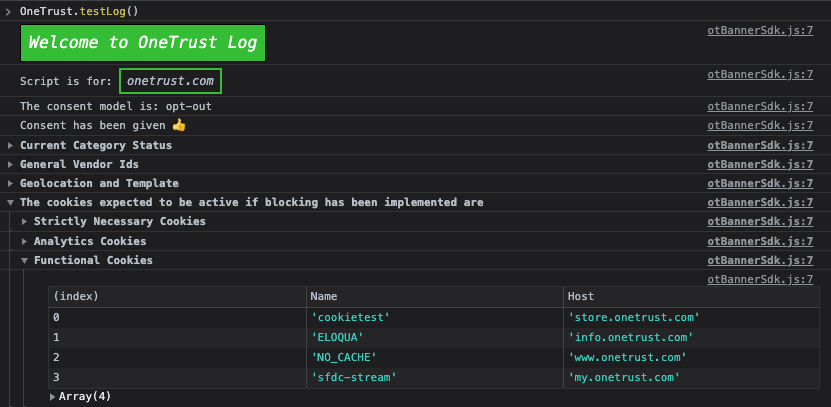
Test Log
| Method | OneTrust.testLog() |
| Description | Returns the core CMP configuration details for the associated script. |
| Returns | Console logs |
Sample return
Change Language Displayed
| Method | changeLanguage(lang) |
| Description | Programmatically update the language used for the CMP UI on the page. Throws an exception if the specified language is not configured for the current template. |
| Parameters | lang(string): 2-digit ISO 639 language code. Ensure the specified language is configured for the current template. |
Sample reference
OneTrust.changeLanguage("en"); // English
OneTrust.changeLanguage("fr"); // French
OneTrust.changeLanguage("de"); // German
Fetch Preference Center UI Data
| Method | OneTrust.FetchAndDownloadPC() |
| Description | Retrieves the HTML and CSS assets for the Preference Center UI. This method only works if 'Prevent fetching Preference Center' has been enabled in your publish settings and no existing preference center data is present on the browser. |
Get Geolocation Data
| Method | OneTrust.getGeolocationData() |
| Description | Returns the user’s location using an IP-based lookup. |
| Returns | JSON |
Get CSS
| Method | OneTrust.getCSS() |
| Description | Returns the CSS used to render the CMP UI. |
| Returns | string |
Get HTML
| Method | OneTrust.getHTML() |
| Description | Returns the HTML used to render the CMP UI. |
| Returns | string |
Update Purpose/Category Consent
| Method | OneTrust.UpdateConsent(groupIdType,bitValue) |
| Description | Programmatically enable or disable consent for a category, host, or vendor. |
| Parameters | groupIdType(string),bitValue(string) |
Sample reference
OneTrust.UpdateConsent("Category","C0003:1"); //Enable consent for Purpose C0003
OneTrust.UpdateConsent("Category","C0004:0"); //Disable consent for Purpose C0004
OneTrust.UpdateConsent("Category","C0002:1,C0003:1,C0004:0"); //Enable consent for Purpose C0002 and C0003, disable consent for Purpose C0004

OneTrust.UpdateConsent("Host","H2:1"); //Enable consent for Host H2
OneTrust.UpdateConsent("Host","H3:0"); //Disable consent for Host H3

OneTrust.UpdateConsent("General Vendor","V33:1"); //Enable consent for General Vendor V33
OneTrust.UpdateConsent("General Vendor","V34:0"); //Disable consent for General Vendor V34
Set Data Subject ID
| Method | OneTrust.setDataSubjectId(dataSubjectId, isAnonymous, identifierType) |
| Description | Set an identifier for the current user. Optionally, specify By default, |
| Parameters | dataSubjectId (string), isAnonymous (boolean), identifierType (string) |
Sample reference
OneTrust.setDataSubjectId("someId")

OneTrust.setDataSubjectId("someId", true)

OneTrust.setDataSubjectId("[email protected]", false, "Email")
Get Data Subject ID
| Method | OneTrust.getDataSubjectId() |
| Description | Returns the current data subject ID |
| Returns | string |
Sync Consent Profile
| Method | OneTrust.syncConsentProfile(dataSubjectId, JWT, isAnonymous) |
| Description | This method is used for Authenticated Consent. It retrieves or logs user consent based on the status of the ‘Override server consent’ toggle. For more details, see here. When consent is retrieved from the server, the returned payload can be viewed in Network calls under the For more details on managing known users, see here . |
| Parameters | dataSubjectId (string), JWT (string) isAnonymous (boolean) |
Set Consent Profile
| Method | OneTrust.setConsentProfile(payload) |
| Description | This method is used for Authenticated Consent. It synchronizes the user's consent choices between the server and client. |
| Parameters | payload (json) |
| Conditions | This method works only if authenticated consent has been enabled in your tenant and the associated CMP script is implemented. |
Sample reference
OneTrust.setConsentProfile({
    identifier: "[email protected]", // User ID
    identifierType: "email", // identifier type for Unified Profile
    isAnonymous: false, // set to false for Authenticated Consent
    purposes: [{
            Id: "PURPOSE_ID_1",
            TransactionType: "CONFIRMED"
        },
        {
            Id: "PURPOSE_ID_2",
            TransactionType: "NO_CONSENT"
        }
    ],
    customPayload: {
        Interaction: 5 // Optional interaction count
    }
})
Send Consent Receipt
| Method | OneTrust.SendReceipt() |
| Description | Triggers a consent receipt to be sent to OneTrust. The receipt will be backdated to the last interaction date. This is useful when Authenticated Consent is not enabled but you still need to log a receipt after manually changing/setting the data subject ID. |
Check Vendor Service
| Method | OneTrust.IsVendorServiceEnabled() |
| Description | Checks whether the vendor service feature is enabled. See here for more information. |
| Returns | boolean |
Get Default Identifier Type
| Method | OneTrust.getDSDefaultIdentifier() |
| Description | Returns the default identifier type of the data subject ID. By default, the identifier type is Cookie Unique Id. If Authenticated Consent is in scope, the default identifier type is derived from the Default identifier type field defined in your geolocation rules. |
| Returns | string |
Set Geolocation
| Method | OneTrust.setGeoLocation(countryCode, stateCode) |
| Description | Programmatically set the user’s geolocation. This overrides the automatic reverse IP lookup performed by the OneTrust script. |
| Parameters |
|
Initialize SDK State
| Method | OneTrust.Init(ignoreCssInit) |
| Description | Initializes the SDK state including consent data, GTM macros, and CSS. This initialization occurs automatically during script execution but can be useful for Single Page Applications (SPAs) where the OneTrust script may not be executed again between page views. Multi-page applications can ignore this. |
| Parameters | ignoreCssInit: boolean (optional). Default false. Skips CSS injection if true. |
Sample reference
// common SPA pattern
window.addEventListener('popstate', function() {
    OneTrust.Init();
});
Initialize CMP Banner UI
| Method | OneTrust.InitializeBanner() |
| Description | Re-binds the CMP banner UI’s event listeners (ensuring CTAs function) and sets up the otloadbanner event to trigger banner UI display when applicable. This is typically needed only for Single Page Applications if the banner element is removed from the DOM and must be re-added. This initialization occurs automatically during script execution, so Multi-Page Applications can ignore this. |
Sample reference
router.afterEach(() => {
    OneTrust.InitializeBanner();
});
Update GCM Consent States
| Method | OneTrust.UpdateGCM(callback) |
| Description | Registers a callback function to update Google Consent Mode states when needed. The callback is triggered during script initialization, after the OnetrustActiveGroups data layer variable is populated, and whenever consent changes. |
| Parameters | Callback |
Sample reference
OneTrust.UpdateGCM(function() {
    console.log(
        'Consent changed! Active groups:',
        window
        .OnetrustActiveGroups
        );

    // Custom GCM update logic
    if (typeof gtag ===
        'function') {
        gtag('consent',
            'update', {
                'analytics_storage': window
                    .OnetrustActiveGroups
                    .includes(
                        ',C0002,'
                        ) ?
                    'granted' :
                    'denied',
                'ad_storage': window
                    .OnetrustActiveGroups
                    .includes(
                        ',C0004,'
                        ) ?
                    'granted' :
                    'denied'
            });
    }
});
Check If OneTrust Geolocation Service Is Used
| Method | OneTrust.useGeolocationService |
| Description | Indicates whether the script is utilizing OneTrust’s geolocation service to determine the user’s location. |
| Returns | Boolean |
Initialize Cookie List Table
| Method | OneTrust.initializeCookiePolicyHtml() |
| Description | Fetches and renders the cookie list table into the designated container elements and optionally re-initializes the ‘cookie settings’ button click handlers. This is useful for dynamically loaded pages where the cookie policy element or container is injected after the initial page load, for re-rendering after a language change, or for Single Page Applications where content is dynamically replaced. |
| Parameters | replaceCookieSettingHandlers (boolean, default false) (optional): When set to true, removes existing click handlers for the ‘cookie settings’ button and re-attaches them to prevent duplicate event listeners. |
| Conditions | Page must have a div with id = ot-sdk-cookie-policy or optanon-cookie-policy |
Sample reference
<!-- Add container div to your cookie policy page -->
<div id="ot-sdk-cookie-policy"></div>

<script>
    // Initialize after page load
    document.addEventListener(
        'DOMContentLoaded',
        function() {
            OneTrust.initializeCookiePolicyHtml();
        });

    // For SPAs - re-initialize with handler replacement
    function loadCookiePolicyPage() {
        document.getElementById('content').innerHTML ='<div id="ot-sdk-cookie-policy"></div>';
        OneTrust.initializeCookiePolicyHtml(true);
    }

    // After language change
    OneTrust.changeLanguage('fr').then(
        function() {
            OneTrust.initializeCookiePolicyHtml(true);
        });
</script>
Updated 7 months ago